Blog
What Is a DIN-Rail Industrial PC (and When Should You Use One)?
Teguar Editorial Team · June 20, 2026
If you have ever opened an industrial control cabinet, you have seen the metal rail that circuit breakers, terminal blocks and PLCs snap onto. A DIN-rail industrial PC mounts a full computer the same way — inside the cabinet, beside the control gear. This guide explains the standard behind that rail, why the mounting method matters more than it sounds, how it compares to the alternatives, and exactly what to look for when specifying one.

Mounting method is one of those specifications that looks trivial on a datasheet and turns out to shape the whole installation. Where a computer physically lives — bolted to a wall, hung off the back of a monitor, or clipped into the control cabinet next to the PLC — determines how it is powered, how it is cooled, how it is serviced, and how much panel space it consumes. For automation, energy and machine-building applications, the DIN-rail form factor is often the tidiest answer, and understanding why starts with the rail itself.
Key takeaways
- A DIN-rail PC clips onto the same standardised 35 mm rail as PLCs and breakers, so it installs inside the control cabinet with no drilling and no wasted panel space.
- The rail is defined by IEC/EN 60715, which is what makes snap-on components from different manufacturers mechanically interchangeable.
- DIN mounting shines when the computer belongs beside the control gear — edge gateways, PLC-adjacent compute, protocol conversion, data logging — rather than at an operator's face.
- Specify fanless operation, wide-temperature tolerance, DC (typically 9–36 V) input, and useful I/O such as dual LAN and PoE to make the unit a true cabinet-resident edge device.
The DIN-rail standard, briefly
A DIN rail is a standardised metal rail used to mount control equipment inside enclosures. The name comes from the German standards body (Deutsches Institut für Normung) that first specified it, but the modern definition is international: IEC/EN 60715. The overwhelmingly common profile is the 35 mm "top-hat" rail (type TH35), with 7.5 mm or 15 mm depth. Less common profiles — the "G" rail and 15 mm mini rail — exist, but if someone says "DIN rail" without qualification they almost always mean TH35.
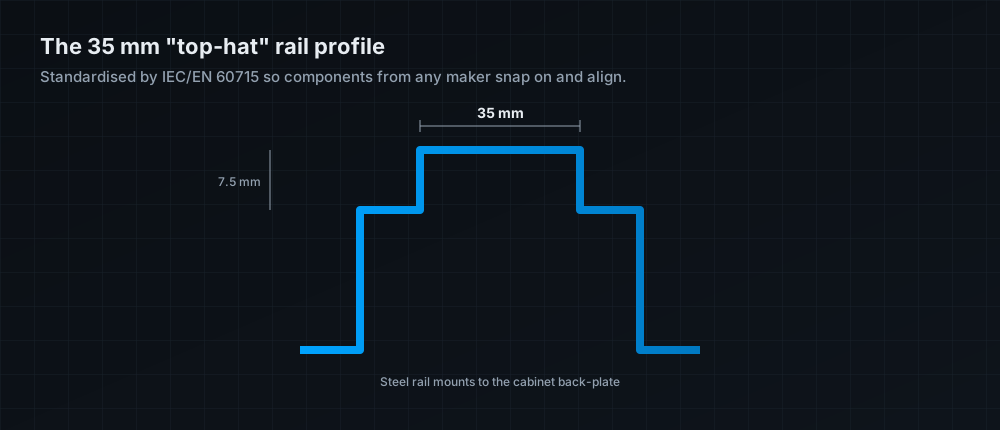
The value of the standard is interoperability. Because the rail's dimensions and the spring-clip geometry on the back of components are fixed, a breaker from one manufacturer, a terminal block from another, and a computer from a third all snap onto the same rail and sit in a predictable plane. That is what makes a control cabinet a modular system rather than a custom fabrication job.
Why mount a PC on a DIN rail
The advantages all follow from putting the computer inside the cabinet, on the rail:
- No drilling, no wasted panel space. The PC drops into the same cabinet as the PLC, power supplies and I/O. You are not sacrificing door real estate or fabricating a mounting plate.
- Fast, tool-free service. Components snap on and off the rail, so swapping a spare during a line stoppage is a matter of seconds, not unscrewing a bracket in an awkward corner.
- Compact vertical layout. Cabinets are organised in horizontal rows of rail; a slim DIN PC fits that grammar and keeps the wiring tidy.
- It lives where the data is. Sitting beside the PLC and I/O, the computer is inches from the signals it needs to read, log or act on — ideal for edge gateways and protocol conversion.
DIN-rail versus the other mounting methods
DIN mounting is not always the right answer. It is optimised for a computer that belongs with the control gear, not one an operator needs to see and touch. Here is how the common options compare:
| Mounting | Where the PC goes | Best for | Trade-off |
|---|---|---|---|
| DIN rail | Inside the control cabinet, on the 35 mm rail | Edge gateways, PLC-adjacent compute, data logging, protocol bridging | Not operator-facing; constrained by cabinet depth |
| Panel mount | Cut into a cabinet door or machine fascia (a panel PC) | Operator HMI at the machine | Requires a cut-out; screen and PC are one unit |
| VESA mount | Behind a monitor or on an arm | Workstations, kiosks, flexible placement | Needs a separate display and hardware to hang from |
| Wall / shelf | Bolted to a surface | General-purpose fixed installs | Consumes wall space; less tidy in a cabinet |
Rule of thumb: if a human needs to look at the computer, you probably want a panel PC. If the computer needs to sit next to the PLC and quietly do its job, you want DIN rail.
What to look for in a DIN-rail PC
The mounting bracket is the easy part. These are the specifications that determine whether the unit will actually survive and earn its place in the cabinet:
| Specification | Why it matters in a cabinet |
|---|---|
| Fanless cooling | Cabinets are dusty and sealed; a fan is a failure point and a dust pump. Fanless means no vents to clog. |
| Wide operating temperature | Sealed cabinets trap heat from every component. Look for wide-temp ratings (e.g. −20 to 60 °C) with margin for your worst-case internal temperature. |
| DC power input | Cabinets run on DC rails (commonly 24 V). A 9–36 V wide-range DC input plugs straight into cabinet power — no external brick. |
| Vibration & shock tolerance | Machine-mounted cabinets vibrate. Solid-state storage (mSATA/M.2) and locking connectors keep it reliable. |
| Edge-gateway I/O | Dual/triple LAN, PoE to power cameras, serial (RS-232/422/485) and CANbus let one small PC bridge protocols and feed the cloud. |
| Compact depth | Cabinet depth is finite. A slim chassis clears the door and the wiring duct. |
Typical applications
DIN-rail PCs cluster around a few recurring jobs: acting as an edge gateway that collects data from PLCs and sensors and forwards it to a historian or cloud; performing protocol conversion between legacy serial/fieldbus devices and modern Ethernet/IP or MQTT; running local data logging and pre-processing so only useful data leaves the machine; and providing PLC-adjacent compute for tasks the PLC itself is not suited to, such as database writes, light analytics or a local web dashboard. In each case the computer benefits from living on the rail, beside the gear it talks to.
The bottom line
A DIN-rail industrial PC is the right tool when the computer's job is to sit inside the control cabinet and work alongside the PLC — not to face an operator. The 35 mm rail and IEC/EN 60715 standard give you drill-free installation, tool-free service and a tidy, modular cabinet. To make it dependable, specify it like the harsh-environment device it is: fanless, wide-temperature, DC-powered, vibration-tolerant, and equipped with the LAN, PoE and serial I/O that let it double as an edge gateway. Get those right and a small box on a rail becomes one of the most useful and lowest-maintenance computers in the plant. Browse industrial box PCs, including DIN-mountable models like the TB-4845-DIN.
Frequently asked questions
What is a DIN rail?
A standardised metal mounting rail — most commonly the 35 mm 'top-hat' (TH35) profile defined by IEC/EN 60715 — used to snap-mount control equipment like breakers, PLCs and computers inside an enclosure.
Why use a DIN-rail PC instead of a panel or wall mount?
Because it installs inside the control cabinet beside the PLC and I/O with no drilling, saves panel space, and can be swapped in seconds. It's ideal when the computer doesn't need to face an operator.
Are DIN-rail PCs fanless?
The best ones are. A sealed, dusty cabinet is the worst place for a fan, so a fanless design with no vents to clog is strongly preferred and usually paired with wide-temperature tolerance.
How is a DIN-rail PC powered?
Typically from the cabinet's DC rail via a wide-range input such as 9–36 V DC, which plugs straight into 24 V cabinet power without an external power brick.
Can a DIN-rail PC act as an IoT/edge gateway?
Yes — that's a primary use. With dual LAN, PoE, serial and CANbus interfaces it can collect data from PLCs and sensors, convert protocols, log locally, and forward data to a historian or the cloud.