Blog
GPU Industrial Computers for Machine Vision and Edge AI
Teguar Editorial Team · July 1, 2026
Inspecting parts at line speed or running an AI model where the data is created takes more than a capable CPU. GPU-accelerated industrial computers bring parallel compute to the factory floor — reliably, in conditions that would kill a desktop workstation. This paper explains why the GPU belongs at the edge, how the vision and inference pipeline actually flows, what separates an 'industrial' GPU computer from a gaming PC, and how to size and specify one for your workload.

Two forces are pushing serious compute out of the data centre and onto the plant floor. The first is the workload: modern quality inspection, defect detection, robotic guidance and predictive-maintenance models are deep-learning problems, and deep learning is a massively parallel computation that a GPU performs far faster than any CPU. The second is physics and economics: streaming high-resolution video to the cloud for inference adds latency, consumes bandwidth, depends on connectivity, and sends potentially sensitive data off-site. Put those together and the answer is a GPU computer that runs the model locally — but one built to survive the factory, not the office.
Key takeaways
- Machine vision and AI inference are parallel workloads that run dramatically faster on a GPU than a CPU.
- Running inference at the edge cuts latency from hundreds of milliseconds to single-digit milliseconds, keeps data on-site, and works without reliable connectivity.
- An 'industrial' GPU computer pairs the accelerator with fanless/rugged thermals, wide-temperature operation, vibration tolerance and machine-vision I/O.
- Size the GPU to your model and frame rate, then verify the thermal design suits your ambient — an under-cooled GPU throttles and misses frames.
Why put a GPU at the edge
Machine vision and neural-network inference share a computational shape: the same operation applied across millions of pixels or weights at once. GPUs were built for exactly that kind of parallelism, which is why a mid-range GPU can outrun a high-end server CPU by an order of magnitude on these tasks. But raw speed is only half the argument. The other half is where the computation happens.
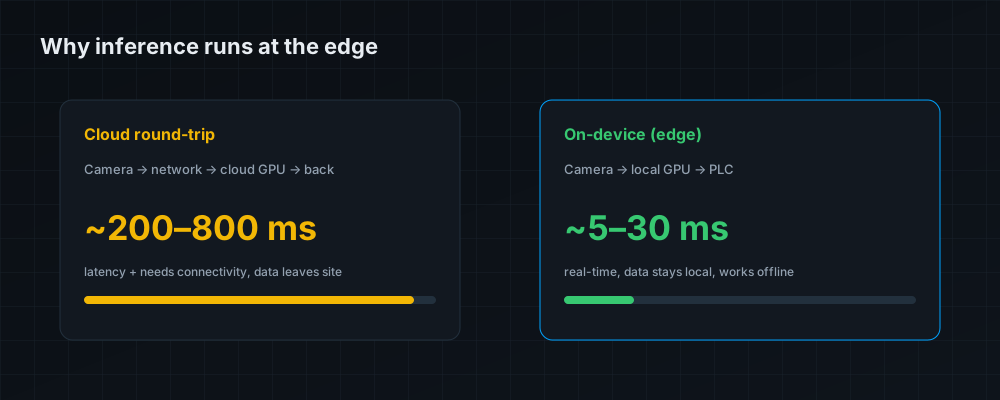
A cloud round-trip — camera to network to remote GPU and back — typically costs hundreds of milliseconds and presumes a reliable connection. For a reject gate that has to fire while the part is still under the camera, that is far too slow. On-device inference collapses the loop to a few milliseconds, runs whether or not the internet is up, and keeps video and process data inside the plant. That is the core idea behind edge AI, and it is why the GPU needs to be on the line, not in a distant rack.
The vision-and-inference pipeline
It helps to see where the GPU sits in the flow. A typical machine-vision loop runs: camera → capture/interface → GPU pre-processing and inference → decision → actuator/PLC. The industrial computer is the middle three stages. It ingests frames over a machine-vision interface, the GPU runs pre-processing and the neural network (usually via CUDA and TensorRT on NVIDIA's embedded and discrete platforms), and the result is handed to a PLC or actuator to sort, reject or guide. Every link has to keep up with line speed, which is why both the GPU and the I/O matter.
What makes a GPU computer "industrial"
A gaming PC with a big GPU is not an industrial vision computer. The industrial version adds the traits a factory demands:
| Trait | Why the factory needs it |
|---|---|
| Fanless or filtered-rugged thermals | Dust and airborne coolant destroy fans and clog filters; a sealed thermal design keeps the GPU cool without ingesting the environment |
| Wide operating temperature | Enclosures and machine cabinets get hot; the GPU must sustain full clocks at elevated ambient without throttling |
| Vibration & shock tolerance | Machine-mounted computers vibrate constantly; retained GPUs, soldered memory and SSDs prevent intermittent faults |
| Industrial I/O | GigE Vision, USB3 Vision, CameraLink, isolated DIO, serial and CANbus to talk to cameras, sensors and PLCs |
| Wide-range DC power & lockable connectors | Runs off cabinet DC and stays connected under vibration |
| Long lifecycle & driver stability | Industrial platforms are supported for years, not replaced every product cycle |
A consumer GPU card throttles or shuts down when it can't dump heat into open air. Industrial GPU computers are engineered around a fixed thermal budget so the accelerator holds its clocks — the difference between hitting frame rate and dropping parts.
Sizing the GPU to your workload
Match the accelerator to the model and the throughput, not to the biggest number in the catalogue. A rough guide:
| Workload | Typical need | GPU class |
|---|---|---|
| 1–2 cameras, classic vision + light CNN | Modest inference, low power | Embedded GPU / entry module (e.g. Jetson-class) |
| Multi-camera inspection, real-time defect detection | Sustained high frame rate | Mid-range embedded or discrete RTX-class GPU |
| High-res 3D, multi-model, or on-line training | Large models, high throughput | High-end discrete GPU with ample VRAM |
The two numbers that most often bite are VRAM (too little and a model won't load or must be shrunk, costing accuracy) and sustained throughput at your frame rate (a GPU that benchmarks well but throttles in your enclosure will silently miss frames). Always validate with your actual model and camera count, in something close to your real ambient temperature.
I/O and camera interfaces
The GPU is useless if frames can't reach it fast enough. Confirm the computer offers the right camera interface for your sensors — GigE Vision (long cable runs, multi-camera, PoE-powered), USB3 Vision (high bandwidth, short runs), or CameraLink (deterministic high speed) — plus enough PoE budget to power the cameras, and the fieldbus/DIO to hand decisions to the PLC. Under-provisioned I/O is a common and avoidable bottleneck.
Deployment and reliability
Finally, treat the install like any harsh-environment deployment: give the unit clear space for its thermal solution, power it from a clean DC supply, use lockable connectors, and specify solid-state storage. Where the environment is also wet or dusty, look for a sealed rugged chassis. Explore AI & edge computers and rugged AI box PCs such as the REGIS TB-7393, which delivers NVIDIA RTX-class graphics in a fanless, vibration-tolerant chassis built for the line.
The bottom line
Machine vision and edge AI are GPU problems that belong on the factory floor, not in the cloud — the latency, bandwidth, connectivity and data-locality maths all point to local inference. But the accelerator only earns its keep inside a computer engineered for the environment: fanless or rugged thermals that hold the GPU's clocks, wide-temperature and vibration tolerance, and the machine-vision I/O to feed it frames and hand off decisions. Size the GPU to your real model and frame rate, validate it at your real ambient, and provision the I/O to match — do that, and you get inspection and inference at line speed, reliably, for years.
Frequently asked questions
Why not just run inference in the cloud?
On-site inference cuts latency from hundreds of milliseconds to single digits, keeps video and process data local, avoids bandwidth costs, and keeps working when connectivity is unreliable — all essential for real-time line decisions.
What GPU do I need for machine vision?
It depends on model size, camera count and frame rate. Light single-camera tasks suit an embedded GPU module; multi-camera real-time inspection wants a mid-range or RTX-class discrete GPU; large 3D or multi-model work needs a high-end GPU with ample VRAM.
Can GPU computers be fanless or rugged?
Yes. Rugged AI platforms use sealed, fixed-budget thermal designs so the GPU holds its clocks without ingesting dust or coolant — essential for reliable operation on the factory floor.
What camera interfaces should the computer support?
Match your sensors: GigE Vision for long runs and multi-camera PoE setups, USB3 Vision for high bandwidth over short runs, or CameraLink for deterministic high-speed capture — plus enough PoE budget to power the cameras.
What most often limits real-world GPU performance?
Thermals and VRAM. A GPU that benchmarks well but throttles in a hot enclosure will drop frames, and too little VRAM forces you to shrink the model and lose accuracy. Validate with your actual model at your actual ambient temperature.